
Opera Sydney Go Locker1.2 - Google Play
You'll be able to see results in few seconds.
Publisher Description
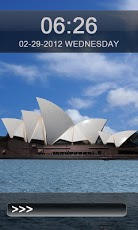
This is a custom lockscreen replacement app with image of Sydney Opera building which is a magnificent, considered as a one of the wonders of the modern world. This application makes your android phone look similar to iphone products locker like ipad and iphones.Note for the app to work correctly you must have golauncher and golocker installed on your andropid phone.Opera Sydney Go Locker has a high quality graphics where a Sydney’s one of the beautiful building is shown with a sky blue colour. The Sydney Opera is a beautiful building and considered as one of the wonders of the modern world. It is located at a prominent location on a peninsula near Sydney’s harbour. It is a multi-venue performing arts centre. The Sydney Opers symbolises art and culture of Australia. The beautiful matching background further adds to the panorama of the locker screen designed for your precious smartphone.Features:-Beautiful HD wallpaper images-Matching slidersThis theme doesn't need ADW or Magic Locker to work; you only need to Go Launcher EX Locker to get this app working. You can also download our other go locker themes with more beautiful backgrounds.Important instruction: GO Launcher EX V2.67 or above and GO Locker v1.05 should be installed on your phone to get this locks screen theme app working. .Stay updated as we add more Go Locker wallpaper themes to the android market for better customization of your phone that comprises of Eiffel tower locker screens, Redeemer – Statue of Jesus Christ Go Locker screens, Statue of liberty Go Locker screen and many more.The lock screens has been tested extensively on various mobile models comprising Motorola droid and defy, various models of Samsung Galaxy, HTC wildfire and one v, Sony ericcson Xperia. Resolutions tested: 240*320, 320*480,480*800, and 480*854. The application is not designed for tablets.USE INSTRUCTIONS:1. Go to MENU->Preferences->Theme Settings—>GO Locker - iPhone Lock to choose the theme2. Enable Go Locker from Go Locker settings3. Exit the appIf you have some improvements, then please write to us. The locker screen is ad supportedTags: GoLocker Theme, golocker, lock screens, locker screens, opera house sydney, opera sydney Australia, android applications free, droid phone.
About Opera Sydney Go Locker
The company that develops Opera Sydney Go Locker is Crazy cool Lockers. The latest version released by its developer is 1.2.
To install Opera Sydney Go Locker on your Android device, just click the green Continue To App button above to start the installation process. The app is listed on our website since 2012-12-26 and was downloaded 0 times. We have already checked if the download link is safe, however for your own protection we recommend that you scan the downloaded app with your antivirus. Your antivirus may detect the Opera Sydney Go Locker as malware as malware if the download link to com.mypandalocker.micoaust.operasydgolocker is broken.
How to install Opera Sydney Go Locker on your Android device:
- Click on the Continue To App button on our website. This will redirect you to Google Play.
- Once the Opera Sydney Go Locker is shown in the Google Play listing of your Android device, you can start its download and installation. Tap on the Install button located below the search bar and to the right of the app icon.
- A pop-up window with the permissions required by Opera Sydney Go Locker will be shown. Click on Accept to continue the process.
- Opera Sydney Go Locker will be downloaded onto your device, displaying a progress. Once the download completes, the installation will start and you'll get a notification after the installation is finished.
Program Details
System requirements
Download information
Pricing
Version History
version 1.2
posted on 2012-12-26
Several fixes and updates
version 1.2
posted on 2012-12-26
Disclaimer
Official Google Play Link
We do not host Opera Sydney Go Locker on our servers. We did not scan it for viruses, adware, spyware or other type of malware. This app is hosted by Google and passed their terms and conditions to be listed there. We recommend caution when installing it.
The Google Play link for Opera Sydney Go Locker is provided to you by apps112.com without any warranties, representations or guarantees of any kind, so access it at your own risk.
If you have questions regarding this particular app contact the publisher directly. For questions about the functionalities of apps112.com contact us.
